
- SeaArt AI is a browser-based all-in-one AI creation platform for images, videos, audio, and AI characters — developed by SUNRISEAI PTE. LTD. (Singapore).
- It supports 980,000+ models including Stable Diffusion, LoRA, Checkpoint, and Pony.
- The free tier provides daily stamina credits with no account required to start generating.
- Paid plans run from US$5.99/month (Beginner) to US$127.49/month (Master), based on a stamina-per-day system.
- The StarDream 2.0 video model supports text-to-video, image-to-video, and reference-to-video at resolutions up to 4K Pro.
- Mobile apps are available on iOS (4.1 stars, 682 ratings) and Android (4.2 stars, 13.2K reviews, 5M+ downloads).
- SeaArt AI is rated 12+ on Google Play and 18+ on the App Store due to user-generated content.
SeaArt AI (seaart.ai) is an all-in-one AI creation platform that generates images, videos, audio, and interactive characters from text prompts or uploaded reference images. Developed by SUNRISEAI PTE. LTD. in Singapore, the platform supports over 980,000 AI models including Stable Diffusion checkpoints, LoRA, and Pony variants. It is accessible directly in the browser without installation, with no login required to start generating on the free tier. As of August 2026, SeaArt AI has over 5 million Android downloads and holds a 4.2-star rating across 13,200 Google Play reviews.
What Is SeaArt AI?
SeaArt AI is a cloud-based generative AI platform that consolidates image generation, video creation, AI audio, and AI character tools into a single browser interface. It is operated by SUNRISEAI PTE. LTD. (also referenced as Star Cluster PTE. LTD.) and is headquartered in Singapore. The platform runs on a stamina-based credit system — each generation task consumes stamina proportional to the complexity of the output requested.
Unlike platforms that specialize in a single output type, SeaArt AI spans five distinct creative modes: Image, Video, AI App (character tools), Agent, and Audio. Advanced users can access ComfyUI workflow for granular parameter control, and train custom Stable Diffusion models directly on the platform without local hardware.
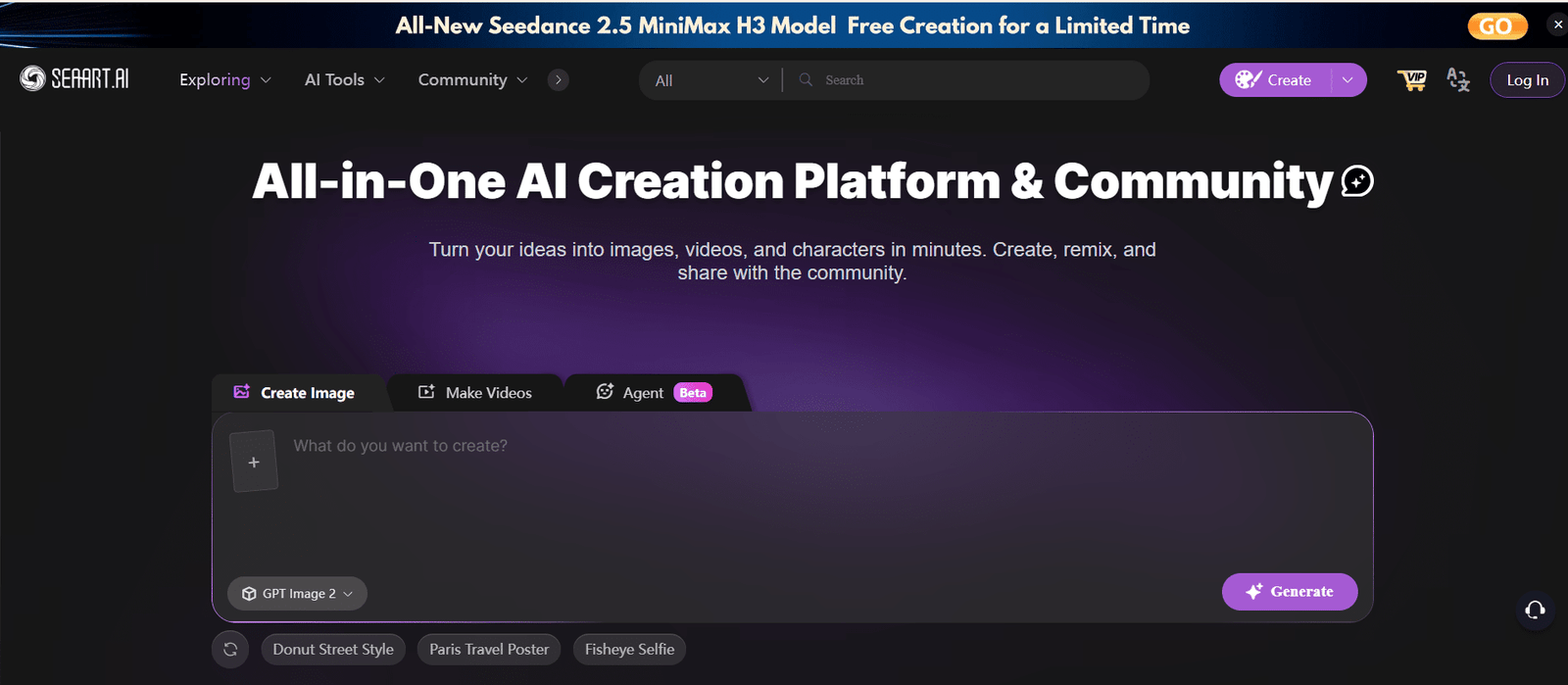
SeaArt AI's main creation interface — offering Image, Video, Agent, and Audio generation from a single no-login platform at seaart.ai
SeaArt AI Key Features
1. Text-to-Image Generation
SeaArt AI generates images from text prompts across styles including anime, photorealistic portraits, concept art, fantasy, and sci-fi. The model library contains over 980,000 options — Checkpoint, LoRA, Pony, and others — making it one of the largest model selections of any consumer AI image platform. Users can select a model, enter a positive and negative prompt, set resolution and batch size, and generate up to 8 images per batch on Standard and above plans.
2. AI Video Generation (StarDream 2.0)
SeaArt AI's video creation tool, accessible at seaart.ai/create/video, uses the StarDream 2.0 model as the primary video generator. Three generation modes are available:
- Reference to Video — Upload reference images or videos and combine elements (characters, props, scenes) to define dynamic interactions
- Image to Video — Animate a static image with motion parameters
- Text to Video — Generate video clips entirely from a text prompt
Supported output resolutions: 480p, 720p, 1080p, 2K, 4K, and 4K Pro (4K and 4K Pro require Standard plan or above). Aspect ratios: 16:9, 4:3, 1:1, 3:4, 9:16, 21:9. Default generation duration is 5 seconds, configurable per task. A character preset library of 13+ named AI characters (Pop Iris, Ava Finch, Social Kai, etc.) is available for reference-to-video sessions.
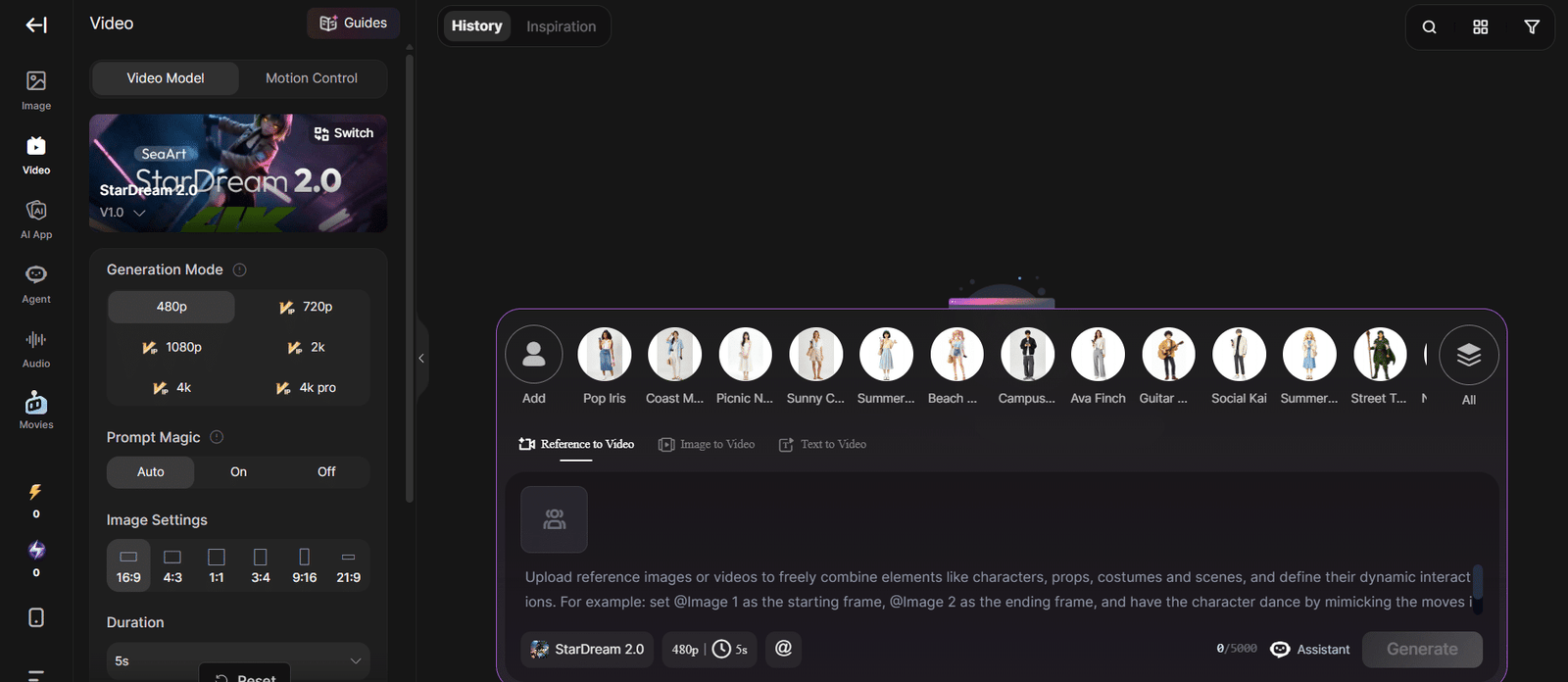
SeaArt AI video generator studio — StarDream 2.0 model with resolution options up to 4K Pro, character presets, and Reference to Video, Image to Video, and Text to Video modes
3. Custom Model Training (LoRA & Stable Diffusion)
SeaArt AI allows users to train custom Stable Diffusion-based models in the browser, eliminating the need for local GPU hardware. LoRA training is available on Standard plan and above, with priority queue access on Professional and supreme queue access on Master. Trained models can be saved, reused across sessions, and optionally shared with the SeaArt AI community.
4. ComfyUI Workflow
Advanced users can access ComfyUI-style node-based workflows to control every generation parameter: prompt weighting, sampler selection, CFG scale, seed control, and more. This is the tool of choice for power users who need reproducible, highly customized outputs rather than one-click generation.
5. Swift AI Tools
Swift AI Tools is SeaArt AI's suite of image editing utilities: image upscaling, face restoration, face swap, background removal, and inpainting. These tools consume stamina but provide professional-grade editing without requiring a separate software subscription.
6. AI Character Creation (Cyberpub)
The Cyberpub module lets users design interactive AI characters with defined personalities, dialogue styles, and visual appearances. Over 1 million pre-built characters are available; users can also create original characters for narrative, game development, or entertainment projects.
7. AI Audio Generation
SeaArt AI's audio tool converts text into voiceovers with configurable tone, pacing, and character voice selection. Custom voice training is available for users who need a consistent branded or character voice across multiple projects.
SeaArt AI Pricing: Stamina Plans Explained
SeaArt AI uses a stamina-based pricing model where each plan provides a set number of stamina credits per day. Stamina regenerates daily and does not roll over. A first top-up gift equal to the plan's daily stamina is included on initial subscription. All prices shown reflect current promotional rates (15% off standard prices) as of August 2026.
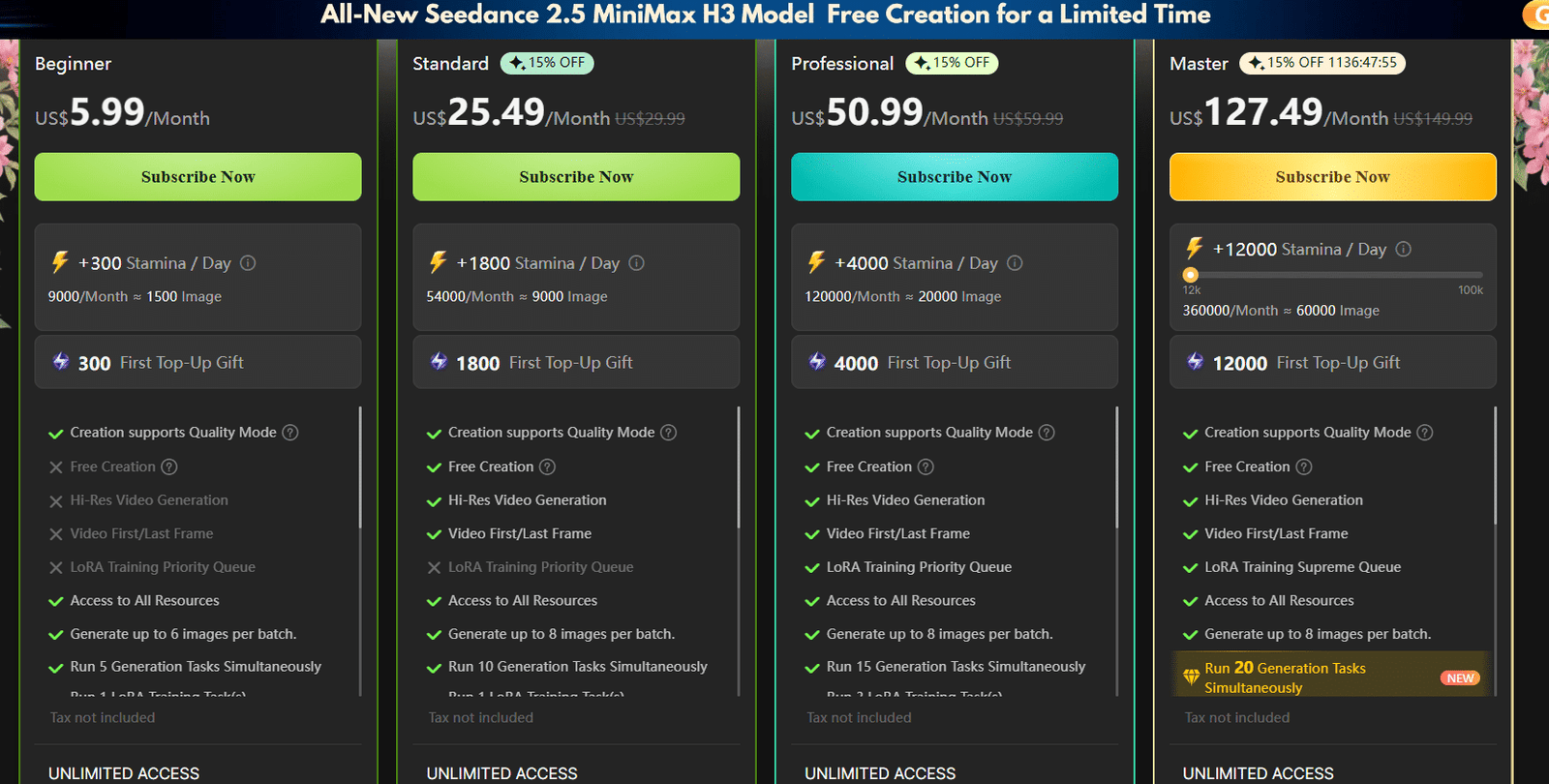
SeaArt AI subscription plans — four paid tiers from US$5.99 to US$127.49/month, each based on daily stamina allocation and simultaneous generation task limits
| Plan | Price/Month | Stamina/Day | Approx. Images/Month | Simultaneous Tasks | Key Unlocks |
|---|---|---|---|---|---|
| Free | $0 | Limited daily | ~20 | — | Basic image generation, no login required |
| Beginner | $5.99 | +300/day | ~1,500 | 5 | Quality Mode, all resources, 6 images/batch |
| Standard | $25.49 | +1,800/day | ~9,000 | 10 | Hi-Res Video, Video First/Last Frame, Free Creation, 8 images/batch |
| Professional | $50.99 | +4,000/day | ~20,000 | 15 | LoRA Training Priority Queue, 15 simultaneous tasks |
| Master | $127.49 | +12,000/day | ~60,000 | 20 | LoRA Training Supreme Queue, 20 simultaneous tasks (NEW) |
Prices reflect promotional rates as of August 2026. Standard list prices are approximately 15% higher. Always confirm current pricing at seaart.ai before subscribing.
SeaArt AI Mobile App
SeaArt AI is available as a native mobile app on both major platforms, delivering core generation features in a mobile-optimized interface.
iOS App (App Store)
The iOS app is listed as SeaArt AI: Photo & Video Maker in the App Store under the Graphics & Design category. It is developed by SUNRISEAI PTE. LTD., rated 4.1 stars from 682 ratings, and weighs 145.4 MB. The app is designed for iPad and iPhone, classified as 18+ due to user-generated content, and includes in-app purchases. It is not verified for macOS.
- Rating: 4.1 / 5 (682 App Store ratings)
- Size: 145.4 MB
- Age Rating: 18+
- Category: Graphics & Design
- Developer: SUNRISEAI PTE. LTD.
- In-App Purchases: Yes
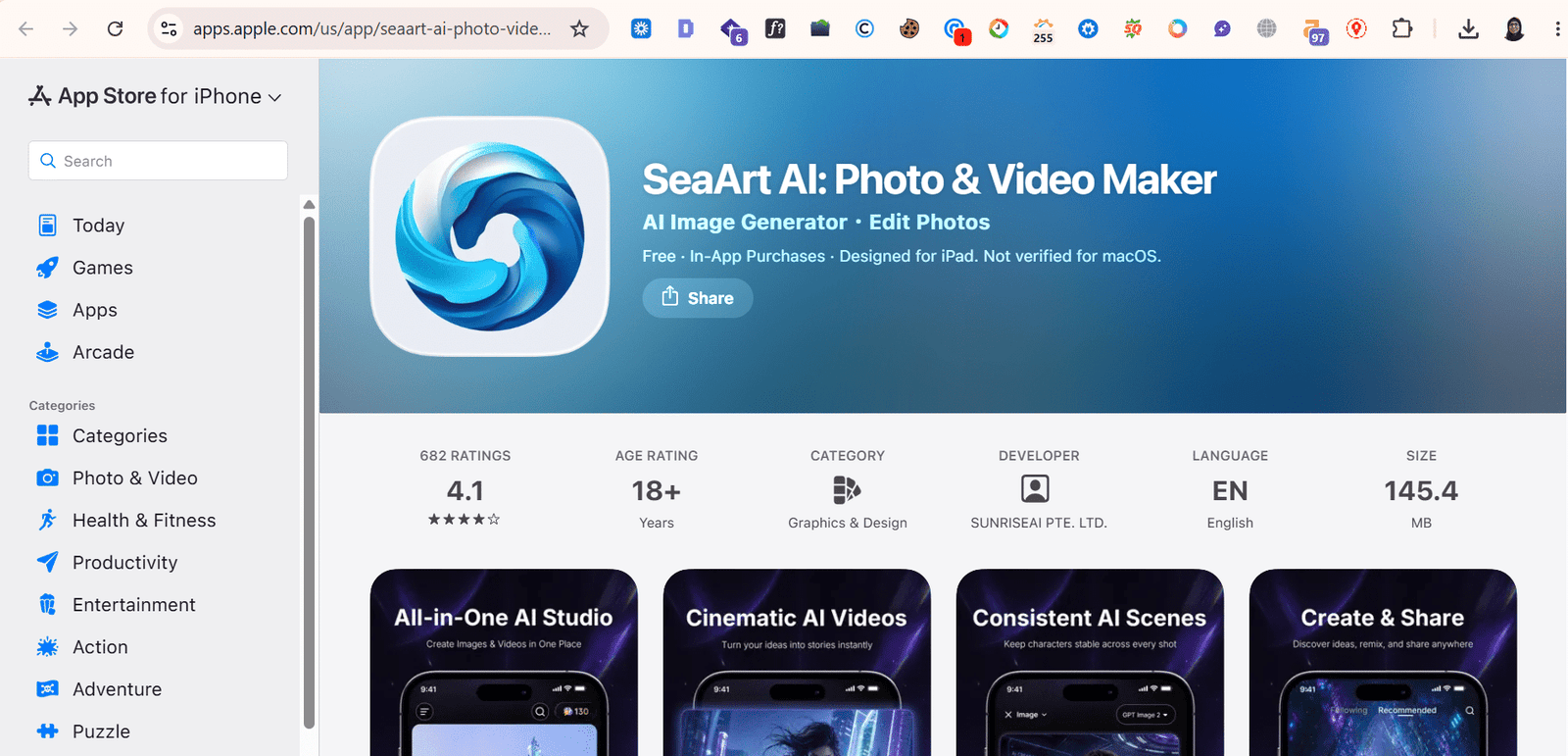
SeaArt AI on the iOS App Store — rated 4.1 stars from 682 ratings, 145.4 MB, developed by SUNRISEAI PTE. LTD., rated 18+ for user-generated content
Android App (Google Play)
The Android app is listed as SeaArt AI: Photo & Video Maker under the Art & Design category. It holds a 4.2-star rating from 13,200 reviews with over 5 million downloads. The app is developed by Seaart ai, rated 12+ (parental guidance recommended), and was last updated on 6 August 2026. In-app purchases are required for full feature access.
- Rating: 4.2 / 5 (13,200 reviews)
- Downloads: 5M+
- Age Rating: 12+
- Category: Art & Design
- Last Updated: 6 August 2026
- In-App Purchases: Yes
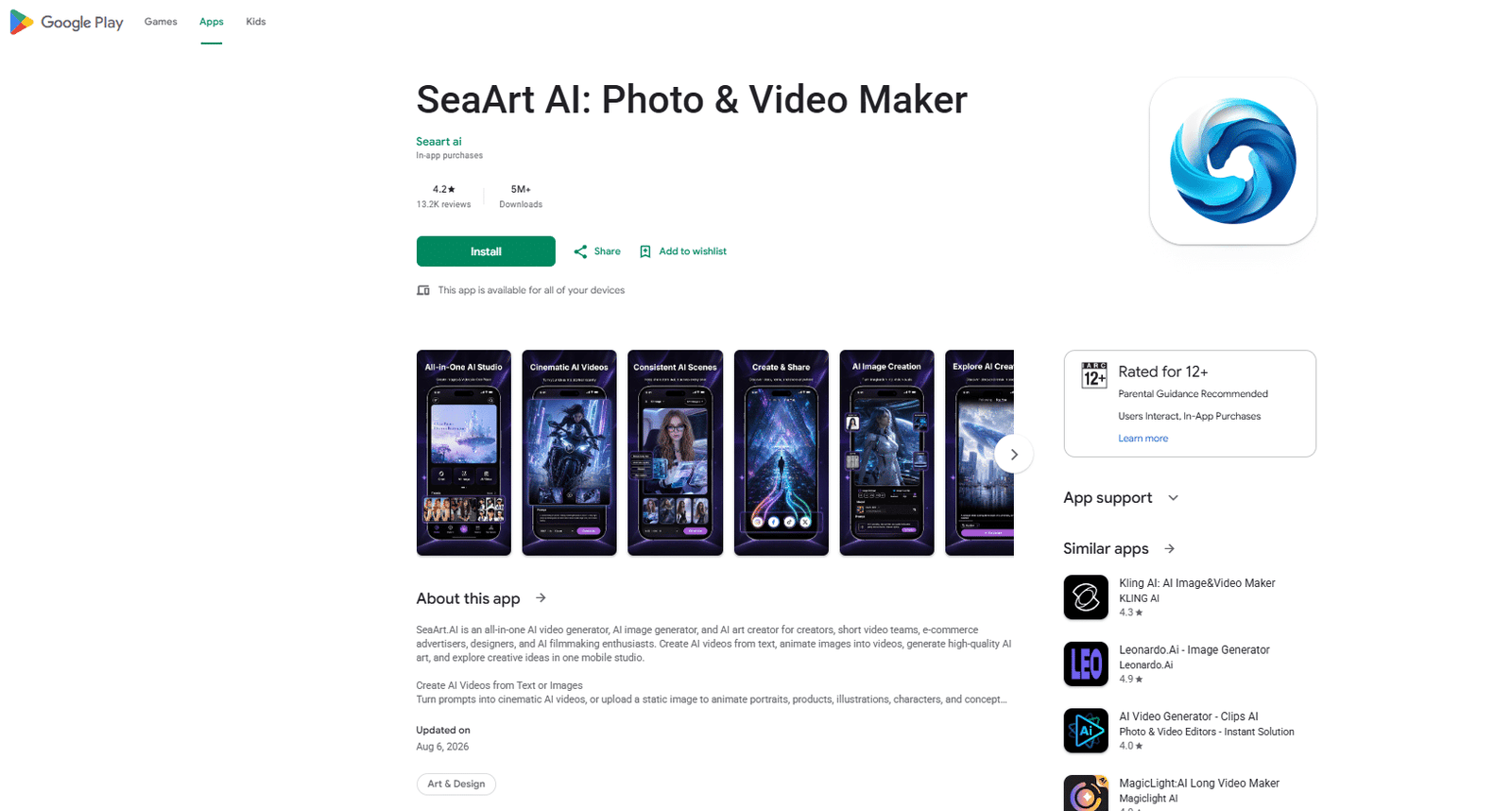
SeaArt AI on Google Play — 4.2 stars from 13,200 reviews, 5M+ downloads, last updated August 6 2026, rated 12+
How to Use SeaArt AI Video Generator
The video generator is available at seaart.ai/create/video. Follow these steps to create your first AI video:
- Open the video studio — Navigate to seaart.ai/create/video in any browser. No installation needed.
- Select your generation mode — Choose Reference to Video, Image to Video, or Text to Video depending on your starting material.
- Choose a video model — StarDream 2.0 (V1.0) is the primary model. Switch to other models using the Switch button if available.
- Set generation parameters — Select resolution (480p to 4K Pro), aspect ratio (16:9, 1:1, 9:16, etc.), Prompt Magic setting (Auto/On/Off), and duration (default 5 seconds).
- Add a character preset (optional) — For Reference to Video mode, select from 13+ character presets or upload your own reference images/videos.
- Enter your prompt — Describe the scene, motion, and style. For Reference to Video, use @Image or @Video tags to define element roles.
- Generate and review — Click Generate. Completed videos appear in History. Download or share directly from the interface.
Tip: Enable Prompt Magic (Auto) to have SeaArt AI enhance your prompt automatically for better motion coherence. Use 9:16 ratio for short-form social content and 16:9 for landscape video.
SeaArt AI vs. Competitors
| Platform | Starting Price | Image Generation | Video Generation | Mobile App | No-Login Free Tier |
|---|---|---|---|---|---|
| SeaArt AI | $5.99/mo | Yes — 980K+ models | Yes — up to 4K Pro | iOS + Android | Yes |
| Midjourney | $10/mo | Yes — high artistic quality | No | No (Discord-based) | No |
| Leonardo AI | $10/mo | Yes — game assets | Limited | Yes | Yes (limited) |
| Adobe Firefly | Included w/ CC | Yes — commercially safe | Limited | Yes | Yes (limited) |
| Runway ML | $15/mo | Limited | Yes — Gen-3 Alpha | Yes | Yes (limited) |
Pros and Cons of SeaArt AI
- Largest model library of any mainstream platform (980,000+)
- Integrated video generator up to 4K Pro resolution
- Free tier requires no account or login
- Competitive pricing — Beginner at $5.99/month
- Full commercial rights on paid plans
- LoRA and Stable Diffusion custom model training in-browser
- ComfyUI workflow for professional-grade control
- Mobile apps on both iOS and Android (4.2 / 4.1 stars)
- No local GPU hardware required
- Stamina does not roll over daily — unused credits are lost
- 4K video generation requires Standard plan ($25.49/month) or above
- iOS app rated 18+ — limits younger audience access
- Hi-Res video is not available on the Beginner plan
- LoRA Training Priority Queue locked to Professional and above
- Requires stable internet — no offline mode
- Some users report subscription cancellation complexity (verify terms before purchase)
Who Should Use SeaArt AI?
- Content creators and social media managers — Generate batch images for posts, thumbnails, and campaigns without a design team. The free tier covers casual daily use.
- Video creators and animators — Use StarDream 2.0 to produce short video clips from prompts or images for reels, ads, and demo content.
- Game developers — Create concept art, character sheets, and environment designs using the 980,000+ model library and custom LoRA training.
- Small businesses — Produce branded visual assets with commercial rights on plans from $5.99/month.
- Artists experimenting with AI — Access ComfyUI workflows and custom model training without installing software locally.
- Educators and students — The free tier and low entry price make it accessible for non-commercial creative exploration.
Frequently Asked Questions About SeaArt AI
What is SeaArt AI?
SeaArt AI (seaart.ai) is an all-in-one AI creation platform by SUNRISEAI PTE. LTD. (Singapore) for generating images, videos, audio, and interactive characters. It supports 980,000+ models including Stable Diffusion, LoRA, and Checkpoint, and is accessible in any browser without installation.
Is SeaArt AI free?
Yes. SeaArt AI offers a free tier with daily stamina for image generation, accessible without creating an account. Paid plans start at US$5.99/month (Beginner, 300 stamina/day) and scale to US$127.49/month (Master, 12,000 stamina/day) for high-volume professional users.
What is SeaArt AI stamina?
Stamina is SeaArt AI's credit system. Each generation task consumes stamina based on resolution and quality settings. The Beginner plan provides 300 stamina per day (approx. 1,500 images/month); the Master plan provides 12,000 stamina per day (approx. 60,000 images/month). Stamina resets daily and does not roll over.
What is SeaArt AI StarDream 2.0?
StarDream 2.0 is SeaArt AI's primary video generation model, available at seaart.ai/create/video. It supports reference-to-video, image-to-video, and text-to-video modes at resolutions from 480p up to 4K Pro. It includes 13+ character presets and configurable aspect ratios and durations.
Is SeaArt AI available on mobile?
Yes. SeaArt AI is available on iOS (4.1 stars, 682 ratings, 145.4 MB, rated 18+, developer: SUNRISEAI PTE. LTD.) and Android (4.2 stars, 13,200 reviews, 5M+ downloads, rated 12+, last updated August 2026). Both apps include in-app purchases for full feature access.
What video resolutions does SeaArt AI support?
SeaArt AI video generator supports 480p, 720p, 1080p, 2K, 4K, and 4K Pro. Hi-Res Video (1080p and above) requires Standard plan or higher. Supported aspect ratios include 16:9, 4:3, 1:1, 3:4, 9:16, and 21:9.
How does SeaArt AI compare to Midjourney?
SeaArt AI starts at US$5.99/month vs Midjourney's US$10/month. SeaArt AI is browser-based with no Discord requirement, offers video and audio generation (Midjourney does not), and supports 980,000+ models. Midjourney produces higher consistency for pure artistic still images. SeaArt AI is better for multi-format all-in-one workflows.
Can I use SeaArt AI outputs commercially?
Paid plan subscribers receive full commercial rights over generated content. Free tier users should review SeaArt AI's terms of service at seaart.ai before any commercial publication, as free tier commercial rights may be restricted. Terms are subject to change.
Conclusion
SeaArt AI is a genuinely comprehensive AI creation platform. Its combination of a 980,000+ model library, StarDream 2.0 video generation at up to 4K Pro, stamina-based pricing from $5.99/month, and a functional free tier with no login requirement makes it one of the most accessible and capable AI creative tools available in 2026.
For users who need AI image generation only and prioritize artistic quality above all else, Midjourney remains a strong alternative. For users who need image, video, audio, and character generation from one platform without managing multiple subscriptions — SeaArt AI is the more practical choice.
Try the free tier directly at seaart.ai or download the mobile app from the App Store or Google Play to evaluate whether it fits your creative workflow before committing to a paid plan.
Related guides on AI Tools Guidance: AI Image Tools | AI Video Tools | Best AI Tools 2026