Jammable is an AI tool that turns any song into a cover sung by a different voice — a celebrity-style voice from its library of 60,000+ community voices, or your own trained voice. It used to be called Voicify AI. As of November 2026 there is no free plan for making covers: you need Basic, Pro or Studio, and Jammable’s terms limit what you make to personal, non-commercial use.
What Jammable does
- AI covers: upload or link a song, pick a voice, and Jammable swaps the vocals.
- Stem downloads: download the finished cover, plus the separate vocal and music tracks.
- Text to speech and duets: make a voice read text, or pair two voices on one track.
- Train your own voice (Pro and Studio): upload your vocals to create a custom voice model.
- Extras on higher plans: “choir mode” backing vocals in your voice, shareable lyric and Marble Run videos, WAV downloads and mix controls.
Is Jammable free?
Not for creating anything. Jammable’s own FAQ says that without a plan “you can browse and listen to every voice”, but “making covers, downloading them, text to speech and duets all need a plan” (Jammable pricing, checked 10 November 2026). Older reviews that mention free covers or free credits are out of date.
Jammable plans compared
All three plans include unlimited covers and the full voice library. The difference is voice training, video and audio quality.
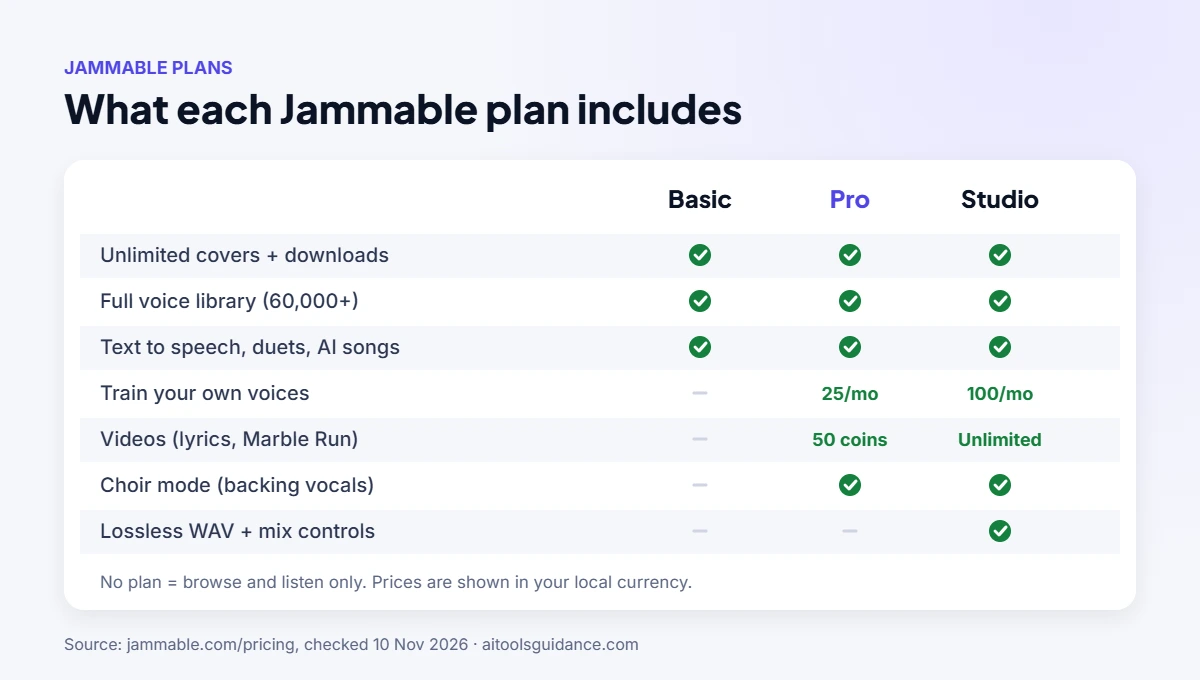
| Feature | Basic | Pro | Studio |
|---|---|---|---|
| Unlimited covers + downloads | Yes | Yes | Yes |
| Full voice library (60,000+) | Yes | Yes | Yes |
| Text to speech, duets, AI song generation | Yes | Yes | Yes |
| Train your own voices | No | 25 / month | 100 / month, priority |
| Videos (lyrics, Marble Run) | No | 50 coins / month | Unlimited |
| Choir mode (backing vocals) | No | Yes | Yes |
| Lossless WAV + mix controls | No | No | Yes |
Prices (USD): Jammable sets prices by country and usually discounts the first month. US reviews checked in September and October 2026 list Basic at $8.99 a month after a $1.99 first month, with higher tiers at $24.99 and $89.99 a month (AutoGPT, Facecam). Those reviews call the higher tiers Creator and Power, while Jammable’s own page now shows Pro and Studio, so check the pricing page for the current names and your local price before subscribing.
How to make your first AI cover
- Sign up and choose a plan (covers aren’t available without one).
- Search the voice library and pick a voice, or train your own on Pro or Studio.
- Add your song: upload an audio file or paste a link.
- Start the conversion and wait for it to finish.
- Download the cover, or the vocals and music separately to remix them.
Tip: a clean studio version of a song (no live crowd, little reverb) gives the best vocal separation and the most natural result.
Is Jammable safe? What its terms say
- Legitimate payments: checkout runs through Stripe, and you can cancel at any time.
- Age: users must be 13 or older; under-18s need a parent’s or guardian’s consent.
- Personal use only: the terms say you “must only use the Services for domestic and private use” and agree “not to use our Services for any commercial or business purposes”.
- No endorsement by the original artists: Jammable says it doesn’t claim any affiliation with the public figures or characters its community voices may resemble.
- Copyright is your responsibility: the terms prohibit using the platform for copyright infringement. Posting covers of commercial songs, especially for money, can get them removed from YouTube, TikTok or streaming services.
Source: Jammable Terms of Service (last updated 19 November 2024).
How to cancel a Jammable subscription
Jammable says you can cancel at any time and your benefits stay active until the end of the current billing period; you keep what you’ve made. Cancel from your Jammable account’s subscription settings. If you subscribed through a mobile app store, cancel through that store instead. Note that the terms limit refunds once you’ve started using the service, under Jammable’s refund policy.
Who Jammable is for (and who it isn’t)
| Good fit | Look elsewhere |
|---|---|
| Fans making covers for fun and sharing with friends | Musicians releasing songs commercially |
| Creators who want stems to remix | Anyone needing licensed, royalty-free vocals |
| Singers who want backing vocals in their own voice (Pro+) | Users who need a free tool |
Jammable alternatives
If you want to create original songs rather than covers, AI song generators are a better fit; see our reviews of Suno AI and Udio AI, and check each tool’s ownership rules before using songs commercially. For spoken voice-overs, try our free text to speech tool, or read how Descript’s voice cloning handles consent.
FAQ
Is Jammable free?
No longer for making covers. Without a plan you can browse and listen to every voice, but making covers, downloading, text to speech and duets all need a paid plan.
Is Jammable safe to use?
Jammable is a legitimate paid service that takes payments through Stripe. Its terms require users to be 13 or older (under-18s need a parent’s consent) and limit use to personal, non-commercial projects.
Can I use Jammable covers commercially?
No. Jammable’s terms say the service is for domestic and private use only, and not for commercial or business purposes.
Is Jammable the same as Voicify?
Yes. Jammable was previously called Voicify AI.
How do I cancel my Jammable subscription?
Jammable says you can cancel at any time and keep your plan’s benefits until the end of the billing period. Cancel from your Jammable account’s subscription settings, or through the app store if that’s where you subscribed.
Can I train my own voice on Jammable?
Yes, on the Pro plan (up to 25 voices a month) and the Studio plan (up to 100 a month). The Basic plan doesn’t include voice training.
Sources: Jammable pricing and FAQ · Jammable Terms of Service · MSPoweruser (former name). Last checked 10 November 2026.