
Descript Overdub: Voice Cloning Consent Rules and How to Set It Up

Descript will only clone a voice after the person who owns that voice records a short consent statement inside Descript. You cannot clone someone else’s voice from a recording, a celebrity’s voice, a deceased person’s voice, or an AI-generated voice. This guide covers the consent rules, how to set up a voice clone step by step, what each plan includes, and how to fix a clone that doesn’t sound right.
A note on the name: Descript’s current help center no longer uses the word “Overdub”. The same feature is now called a custom voice clone, and the cloned voice appears in your project as an AI Speaker. If you’re looking for Overdub in the app, look for those names.
Descript’s voice cloning consent rules
Descript says it “requires explicit recorded authorization from the person whose voice will be used before creating a voice clone” (Descript Help).
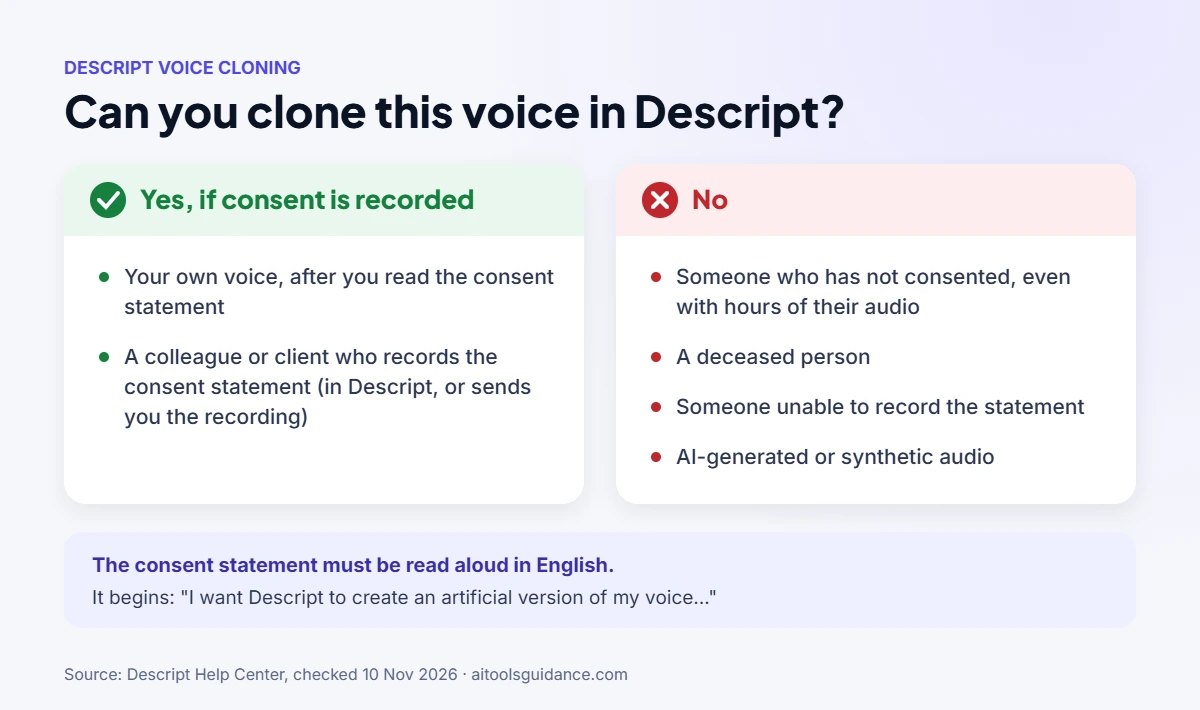
| Situation | Can you create the clone? |
|---|---|
| Your own voice, and you read the consent statement | Yes |
| A colleague’s or client’s voice, and they record the consent statement (in Descript or sent to you as a recording) | Yes |
| Someone who hasn’t consented, even if you have hours of their audio | No |
| A deceased person | No |
| Someone who is unable to record the statement | No |
| Audio from an AI or other artificial source | No |
Three details that trip people up:
- The statement must be read in English, even if you will generate speech in another language.
- It begins: “I want Descript to create an artificial version of my voice that I can use to create speech that sounds like me.” Descript shows the full text on screen when you record.
- If a collaborator can’t record inside the app, they can record the statement themselves and send you the file.
Descript’s ethics statement explains the reason: voice owners should control how their digital voice is used, and the verbal consent check means a voice model can only be created when the owner has authorized it.
How to set up a voice clone in Descript (step by step)
- Open a project and click Add speaker at the top of the composition.
- Choose Create speaker and give it a name.
- Click the speaker label, find the speaker in the dropdown, open the … menu and choose Enable speech generation. (If you see a microphone button on the label, click Clone voice to enable AI speech instead.)
- Pick your microphone, click Record and read the consent statement shown on screen.
- Play it back. Re-record if there is background noise or you stumbled.
- Click Submit. Descript notifies you when the voice is ready, usually within minutes.
You can also create one from the AI Speakers tab in Drive view.
How to use your cloned voice
Once the clone is ready, it appears in your speaker dropdown. Common uses:
- Fix a line without re-recording. Edit the transcript text and Descript generates the corrected words in your voice.
- Build a voice-over from a script. Type or paste the script and assign it to your AI Speaker.
- Mix voices. You can assign different AI Speakers to different sections of one project.
Which Descript plans include voice cloning
Prices and limits as listed on Descript’s pricing page, checked 10 November 2026. The page shows two prices per paid plan; the lower one is the rate with annual billing.
| Plan | Price per editor / month | Custom voice clones | Stock AI speakers |
|---|---|---|---|
| Free | $0 | Limited | Limited |
| Hobbyist | $16–$24 | Included | 25+ |
| Creator | $24–$35 | Included | 25+ |
| Business | $50–$65 | Included | 60+, plus native-sounding speakers in 14 languages |
| Enterprise | Custom | Contact sales | Contact sales |
Generated speech also uses your plan’s monthly AI credits, so heavy voice-over work can run out on the lower plans.
Limits to know before you rely on it
- One delivery style per clone. A single clone can’t switch between, say, calm narration and energetic ads. Create a separate voice for each style.
- No extra training later. You can’t add more voice samples to an existing clone. To improve it, record a fresh consent statement and create a new clone.
- Accents may flatten. Clones are built on a US English pronunciation model, so non-US accents may not come through accurately.
- Model choice affects quality. Descript lets you switch the voice generation model in App Settings. Its help center lists ElevenLabs v2, v3 and v4, and suggests testing each for accents.
Troubleshooting: when the clone doesn’t sound like you
| Problem | What to try |
|---|---|
| Voice sounds robotic or off | Re-record the consent statement in a quiet room with your usual mic, then create a new clone |
| Accent is lost | Try a different voice generation model in App Settings |
| Can’t find Overdub | It’s now under Enable speech generation / AI Speakers |
| Clone option is greyed out | Check your plan: the Free plan’s voice cloning is limited |
| A collaborator can’t open Descript | Ask them to record the consent statement and send you the audio file |
Is Descript voice cloning safe?
The consent check is the main safeguard: it stops anyone from cloning a voice they don’t have permission to use. For how Descript handles your files, security and privacy more broadly, see our guide: Is Descript safe? If voice cloning isn’t a fit, compare Descript alternatives, or try our free text to speech tool for a quick voice-over without cloning.
FAQ
Can I clone someone else’s voice in Descript?
Only if that person records Descript’s consent statement and authorizes you. Descript will not clone a voice from existing recordings alone.
What is the Descript Overdub consent statement?
A short script, read aloud in English, that begins “I want Descript to create an artificial version of my voice…”. Descript shows the full text on screen when you record.
Does the consent statement have to be in English?
Yes, even if you plan to generate speech in another language.
Is Overdub still available in Descript?
Yes, under new names: a custom voice clone, used in your projects as an AI Speaker.
Can I use Descript voice cloning for free?
The Free plan includes voice cloning on a limited basis. Hobbyist, Creator and Business include it fully, within each plan’s monthly AI credits.
How long does it take to create a voice clone?
Descript says the voice is usually ready within minutes of submitting the consent recording.
Sources: Descript Help — Custom AI speaker · Descript Ethics Statement · Descript pricing. Last checked 10 November 2026.


