To use Kobold AI with Janitor AI, run KoboldCpp on your computer, give it a public web address (for example with a free Cloudflare quick tunnel), then add that address in Janitor’s API Settings as a custom model. It’s free and private, but you need a reasonably powerful PC; otherwise Janitor’s own free model is simpler.
What you need
- KoboldCpp: a free, open-source program (AGPL-3.0) that runs GGUF AI models from a single file on Windows, Linux or macOS (Developers Digest).
- A GGUF model that fits your graphics card’s memory.
- A way to make it public: Janitor runs on janitorai.com, so it needs an internet address for your model. Cloudflare’s quick tunnels give a free temporary https address without an account (Cloudflare).
- A Janitor AI account (18+).
Step by step
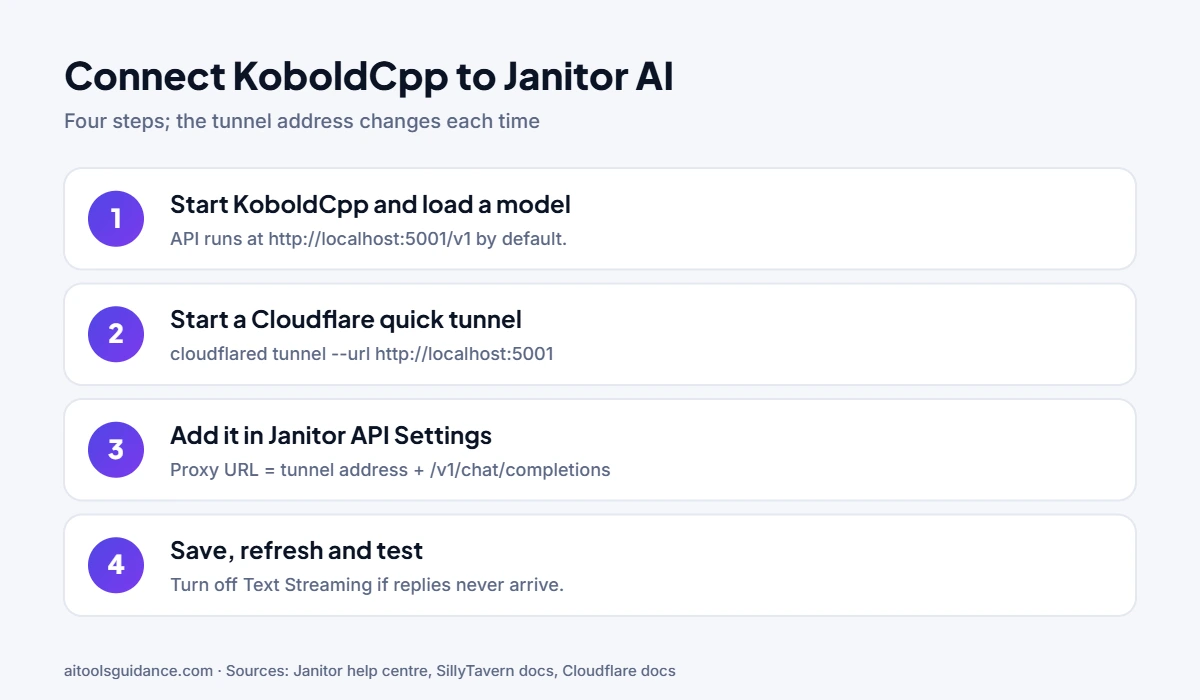
- Start KoboldCpp and load your model. Its console shows the OpenAI-compatible API at
http://localhost:5001/v1/by default (SillyTavern docs). - Create a public address. With Cloudflare’s tool installed, run
cloudflared tunnel --url http://localhost:5001and copy thetrycloudflare.comaddress it prints. - Add it in Janitor. In a chat, click the gear icon > API Settings > Add Configuration. Choose the proxy option and fill in:
- Proxy URL: your tunnel address +
/v1/chat/completions - Model Name: the name of the model you loaded
- API Key: leave it blank, or type any placeholder if the field can’t be empty
Janitor’s own guide uses the same fields for OpenRouter (Janitor help centre). If your API Settings also show a “Kobold AI” option, older guides used that instead.
- Proxy URL: your tunnel address +
- Save, refresh and test with a short message.
Troubleshooting
- Network error: check that KoboldCpp and the tunnel are both still running; quick tunnels stop when you close them and get a new address each time.
- Replies never arrive: turn off Text Streaming in Janitor’s menu. Cloudflare quick tunnels don’t support streamed responses.
- 404 error: make sure the Proxy URL ends in
/v1/chat/completions. - Very slow replies: use a smaller model or fewer context tokens.
- Is it Janitor? Switch back to JLLM to test, or see is Janitor AI down.
Is Kobold AI worth it for Janitor AI?
| Use Kobold if… | Use JLLM or OpenRouter if… |
|---|---|
| You have a gaming GPU and want free, private chats | You’re on a phone or low-power laptop |
| You want to choose exactly which model you use | You want it to just work, every time |
| You don’t mind restarting the tunnel each session | You want longer memory without setup (consider Janitor+) |
Quick tunnels are meant for testing, and anyone with the address can reach your model, so close them when you finish. For a fuller desktop setup, many people use SillyTavern with KoboldCpp instead. New to Janitor? Start with our Janitor AI guide.
FAQ
Can you still use Kobold AI with Janitor AI?
Yes, as a custom model. Run KoboldCpp on your computer, make it reachable with a public URL (for example a Cloudflare quick tunnel), then add that URL in Janitor's API Settings. Older guides used a dedicated 'Kobold AI' option; Janitor's current guides describe the proxy route.
Is Kobold AI good for Janitor AI?
It's good if you have a capable graphics card and want free, private chats with a model you choose. Without a strong PC, Janitor's free JLLM or a hosted model through OpenRouter is easier and usually faster.
What is the difference between KoboldAI and KoboldCpp?
KoboldAI is the original open-source project for running AI text models. KoboldCpp is a separate, popular program in the same family: a single free file that runs GGUF models on Windows, Linux and macOS and offers an OpenAI-compatible API.
What URL do I use for KoboldCpp in Janitor AI?
KoboldCpp's OpenAI-compatible API runs at http://localhost:5001/v1 by default. Janitor needs a public address ending in /v1/chat/completions, so use your tunnel's https address followed by /v1/chat/completions.
Why does Janitor AI show a network error with Kobold?
Usually the tunnel closed, the address changed (quick tunnels get a new one each time), or KoboldCpp stopped. Restart them, paste the new address, and turn off Text Streaming, since Cloudflare quick tunnels don't support streamed replies.
Sources: Janitor help centre: proxy quickstart; SillyTavern docs: KoboldCpp; Developers Digest: KoboldCpp; Cloudflare: Quick Tunnels. Checked 23 November 2026.