
Udio AI: How to Use It, Pricing, Free Credits and Downloads


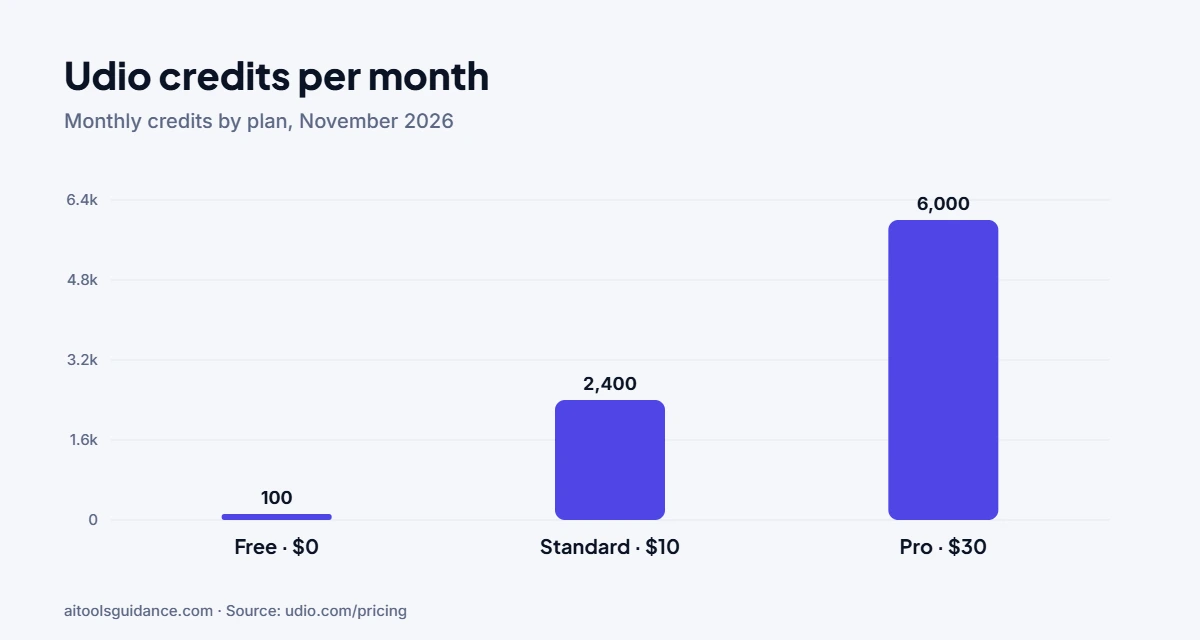
Udio is an AI music generator that turns a text prompt or your own lyrics into a full song with vocals. It’s free to start with 100 credits a month. Paid plans cost $10 or $30 a month. One big change to know first: since October 2025 you can’t download songs from Udio, only share them by link.
What is Udio?
Udio creates songs in almost any genre from a short description, then lets you extend, remix and edit them. On 29 October 2025 it entered a partnership with Universal Music Group, and later reached a similar arrangement with Warner Music Group. As part of the UMG change, Udio raised credit limits and turned off downloads (Udio Help Center).
How to use Udio
- Sign up at udio.com. The free plan needs no credit card.
- Write a prompt. Describe the genre, mood, instruments and topic, for example “upbeat synth-pop about a summer road trip, female vocals”.
- Add lyrics if you want. Paste your own or let Udio write them.
- Generate and compare. Udio makes several versions at once; keep the best one.
- Extend or remix. Build the clip into a full song, change the style, or add an intro and outro.
- Share it. Publish on Udio or share the link. Downloads are currently disabled.
Udio pricing (USD)
From udio.com/pricing, checked 16 November 2026.
| Plan | Billed monthly | Billed yearly | Credits | Key limits |
|---|---|---|---|---|
| Free | $0 | $0 | 10/day, 100/month | 3 full-length (2:10) songs a day |
| Standard | $10/month | $8/month ($96/year) | 2,400/month | No daily cap; Voice Control, lyric editing, audio uploads |
| Pro | $30/month | $24/month ($288/year) | 6,000/month | All features, up to 10 songs at once |
Monthly credits don’t roll over. Extra credits cost $3 for 100 or $25 for 1,000. Udio also offers student pricing.
Can you download Udio songs?
No. Udio’s help center says that, as part of the UMG partnership, “downloading of audio, video, and stems has been disabled”. This applies to paid plans too, so don’t subscribe expecting to export MP3 or WAV files. You can still share songs through a udio.com link.
Pros and cons
| Pros | Cons |
|---|---|
| Strong vocals and many genres | No downloads of audio, video or stems |
| Usable free plan, no card needed | Free plan limited to 3 full songs a day |
| Licensing deals with UMG and Warner | Credits reset monthly with no rollover |
Udio alternatives
The closest alternative is Suno for full songs with vocals. For AI voice covers of existing songs, see Jammable.
FAQ
Is Udio free?
Yes. The free plan gives 10 credits a day and 100 a month, with up to 3 full-length song generations a day and no credit card required. Paid plans start at $10 a month.
How much does Udio cost?
On Udio's pricing page in November 2026: Standard costs $10 a month or $8 a month billed yearly ($96), and Pro costs $30 a month or $24 a month billed yearly ($288). Extra credits cost $3 for 100 or $25 for 1,000.
Can you download songs from Udio?
No. Since Udio's partnership with Universal Music Group on 29 October 2025, Udio's help center says downloading of audio, video and stems has been disabled. You can still share songs with a udio.com link.
How do I use Udio to make a song?
Sign in, type a prompt describing the genre, mood and topic (or write your own lyrics), generate, then extend, remix or edit the result. Paid plans add Voice Control, lyric editing and generating from uploaded audio.
What are good alternatives to Udio?
Suno is the closest alternative for full songs with vocals. For AI voice covers, look at Jammable. Check each tool's current download and commercial-use terms before you rely on it.
Sources: Udio pricing; Udio Help Center: changes after the UMG partnership. Checked 16 November 2026.



1 comment