Decktopus is an AI presentation maker: you type a topic or upload a file, and it builds a complete slide deck with structure, text and design. It also has a built-in rehearsal tool, Loop, that gives AI feedback on your delivery. There is no free plan listed as of November 2026. Pro costs $24.99 a month, or $9.99 a month if you pay yearly.
What Decktopus does
- Prompt-to-deck: describe your presentation or upload a document, and Decktopus generates the slides.
- Prompt-based editing: ask the AI to rewrite, restructure or restyle slides instead of editing each one by hand.
- AI images: generate visuals for slides inside the editor.
- Loop rehearsal: practise out loud and get AI feedback on pacing and clarity (Pro and above).
- Carousels: make social media carousels as well as presentations.
- Export and share: PDF, PPT and PNG export, one-click share links and version history.
- Team features (Business): Brand Kit, team workspace, custom domain and slide analytics.
Decktopus pricing (checked 10 November 2026)
| Plan | Monthly | 3-month plan | Yearly | AI credits | Best for |
|---|---|---|---|---|---|
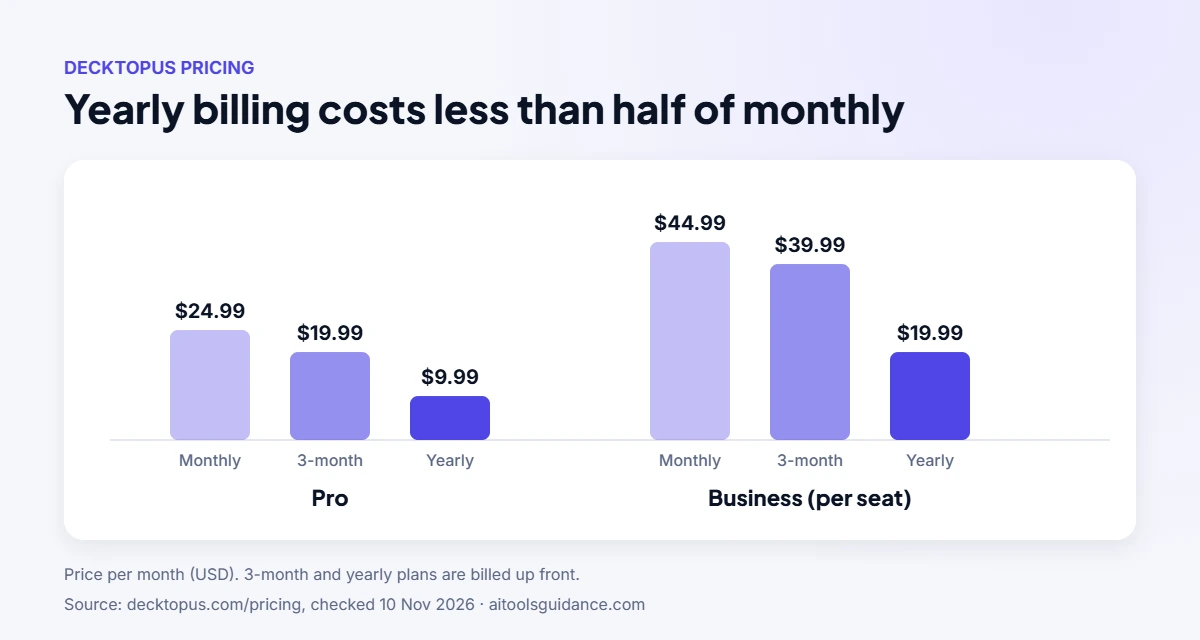
| Pro | $24.99 | $19.99/mo ($59.97) | $9.99/mo ($119.88) | 750 / month (~150 slides) | One person |
| Business | $44.99 / seat | $39.99 / seat / mo | $19.99 / seat / mo ($239.88) | 1,000 / seat / month | Teams that need branding and a shared workspace |
| Enterprise | Custom pricing | Custom | Company-wide rollouts | ||
Source: Decktopus pricing. Paid plans can top up AI credits from account settings, and students get 50% off with the code SUPPORTEDUCATION. The yearly plan costs less than half the monthly price, so it only makes sense if you’ll use it for most of the year.
How to make a presentation with Decktopus
- Start a new presentation and enter your topic, or upload a document to build from.
- Review the generated slides; use prompts to edit, reorder or restyle them.
- Add or generate images, and apply your Brand Kit if you’re on Business.
- Rehearse with Loop, then share a link or export to PDF, PPT or PNG.
Pros and cons
| Pros | Cons |
|---|---|
| A full first draft of a deck in minutes | No free plan to test it on a real project |
| Rehearsal feedback built in (Loop) | Monthly billing is expensive compared with yearly |
| PowerPoint export for editing elsewhere | AI credits cap how much you can generate each month |
| Data excluded from AI training by default | Brand Kit and team workspace need Business |
Decktopus alternatives
- Beautiful.ai: templates that rearrange automatically as you add content. See our Decktopus vs Beautiful.ai comparison.
- Gamma: generates presentations, documents and simple web pages from a prompt.
- Canva: a huge template library with AI design features, good if you already design in Canva.
- Microsoft PowerPoint with Copilot: AI help inside PowerPoint for Microsoft 365 users.
- Pitch: collaborative presentations for teams that build decks together.
Check each tool’s current free plan and pricing before choosing; AI presentation tools change their plans often.
Who should use Decktopus?
Decktopus suits people who present often and want a fast first draft plus help rehearsing: founders, consultants, teachers and sales teams. If you only make a deck or two a year, a tool with a free tier, or PowerPoint’s built-in features, will cost less. To plan your deck’s content before you generate it, try our free AI prompt generator.
FAQ
Is Decktopus free?
Decktopus’s pricing page lists no free plan as of November 2026. Plans start with Pro at $24.99 a month, or $9.99 a month billed yearly.
How much does Decktopus cost?
Pro costs $24.99 a month, $19.99 a month on a 3-month plan, or $9.99 a month billed yearly ($119.88). Business costs $44.99 per seat a month, or $19.99 per seat a month billed yearly.
Can I export Decktopus presentations to PowerPoint?
Yes. Paid plans include PDF, PPT and PNG export.
Does Decktopus use my presentations to train AI?
Decktopus says your data is excluded from AI training by default.
Does Decktopus have a student discount?
Yes. Decktopus offers students 50% off all plans with the code SUPPORTEDUCATION.
Can I cancel Decktopus anytime?
Yes. Cancel from your account settings; you keep access until the end of the billing period and the plan won’t renew.
Source: Decktopus pricing and FAQ. Last checked 10 November 2026.